
From request email to finished business case, in one conversation.
The Precision IT connector gives your AI assistant direct access to our Infrastructure Engine, pricing catalogs and CPM performance data. Ask for a comparison the way you'd ask a colleague, and get a sized, priced, client-ready TCO.
“Price 38 Intel hosts with VMware against AMD EPYC, Power11 and AWS.”
One connector. The same approved assumptions and the same priced result, whichever assistant you open.
What you can send it
Server scans
with cores, memory and measured utilization
Configuration files and bills of materials
including quoted prices and bundled software
Plain-English requests
“Compare this fleet on Intel, AMD, Power and AWS, and keep memory near 30 TB.”
Screenshots and prior reports
from a competing quote or an earlier study
How it works
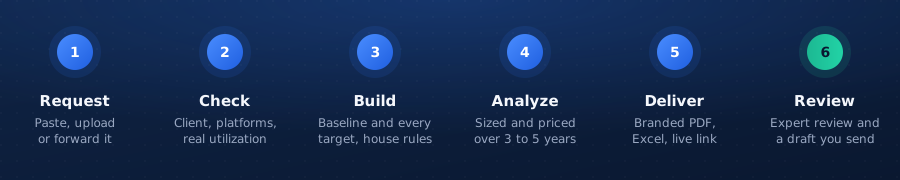
- 1. Request
Paste it, upload it or forward the email.
- 2. Check
Your assistant confirms the client, the platforms to compare and anything missing, starting with real utilization.
- 3. Build
It creates the baseline and every target in one Precision IT environment, under your house assumptions.
- 4. Analyze
The engine sizes and prices each option over 3 to 5 years.
- 5. Deliver
A branded PDF (“Prepared for <client>, Prepared by <you>”), the Excel detail and a live link to the app.
- 6. Review
The assessment is filed for Precision IT expert review, and a reply draft waits in your mailbox for you to send.
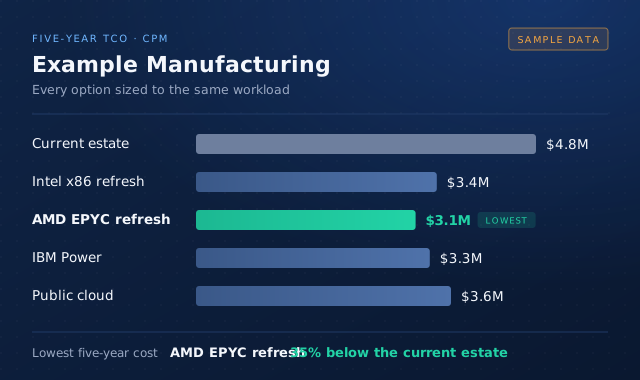
Every analysis comes back as a branded PDF and the Excel detail behind it, ready to send to the client once a person has reviewed it.
What you can analyze
Legacy refresh
“Compare these Power8 and Power9 servers with Power11 over five years.”
On-prem vs cloud, side by side
“Show existing, an AMD EPYC refresh, Power11 and Azure on one page.”
Consolidation
“Can three servers on two sites become one, or one per data center?”
Intel vs AMD vs Power vs cloud
“Price 38 Intel hosts with VMware against AMD EPYC, Power11 and AWS.”
How many do I need
“With three of this config, how many x86 servers match it?”
Hypervisor alternatives
“Intel, AMD and Power options side by side, with VMware and with OpenShift Virtualization.”
Maintenance scenarios
“Run it again with the second maintenance quote as Option 2.”
Fixed-price proposals
“Add this fixed package as a target next to the engine-sized options.”
Quote reconciliation
“Why does our cloud figure differ from the provider's calculator?”
What's in every analysis
Hardware, maintenance, software subscriptions and support, power and cooling with PUE and carbon, floor space, unplanned downtime, migration and other one-time costs, platform discounts, multiple currencies, and 3 to 5 year horizons. Costs that can't be benchmarked by workload (egress, storage, backup, networking, people) are asked for and modeled when you provide them.
Human in the loop
Your assistant drafts; people decide. Replies are saved as drafts and never sent automatically. Every revision is a rerun in the app with its own version history, so anyone picking up an analysis sees what changed and why.
Security and data handling
Your data stays in your organization.
- ▸You sign in to Precision IT before any assistant can reach anything. The assistant acts as you, with your permissions.
- ▸Your assistant sees only the organizations you're licensed for. Other organizations' environments, analyses and assumptions are invisible to it.
- ▸Your house assumptions and environments are private to your organization. They are never shared with other customers or used in anyone else's analysis.
- ▸Catalog access and analyses follow your license, and no assistant can work around a limit.
Nothing changes without you.
- ▸Before your assistant creates or changes an environment, it shows you the plan and waits for your yes. Deletions always need your confirmation.
- ▸Data queries through the connector are read-only. Every change goes through a tracked write that checks you're editing the latest version.
- ▸Reply emails are saved as drafts for you to send, never sent automatically.
Every result can be traced.
- ▸Every analysis is a run in the Precision IT app, with a live link, version history and the assumptions it used.
- ▸Expert review through Assessment-as-a-Service is always available before a result reaches a client.
How your conversations are handled is governed by your assistant's own plan and terms (Anthropic, OpenAI, Google or Microsoft), not by Precision IT.
Who it's for
Manufacturers, cloud providers and their sellers
TCOs from the opportunity, at deal speed.
Channel partners and distributors
The same approved assumptions, without specialist help.
IT buyers
A neutral first pass before you talk to a vendor. Coming soon.
FAQ
- What do I need?
- A Claude, ChatGPT, Gemini or Copilot plan that supports connectors or MCP, plus a Precision IT license.
- Which platforms are covered?
- Intel Xeon and AMD EPYC x86 generations, IBM Power (Power7 to Power11), AWS, Azure, Google Cloud and Power Virtual Server, plus operating system, virtualization, database and middleware software.
- Can I change the assumptions?
- Yes. Give real figures on any request and they replace the defaults.
- Do I still get expert review?
- Yes. Every analysis can be filed for Precision IT Assessment-as-a-Service review.
Bring your next TCO request.
Send us a scan, a quote or an email and see the business case come back in one conversation.